Office relocation: what actually happens to the IT
The IT is the part of an office move that gets scoped last and causes the most trouble. What is actually in scope, the order the decisions have to be made in, and why make-good is a separate obligation.
The part of the office move nobody scoped
It’s week eleven of the office relocation plan. The removalists are booked, the new premises are nearly ready, and someone finally opens the IT storeroom.
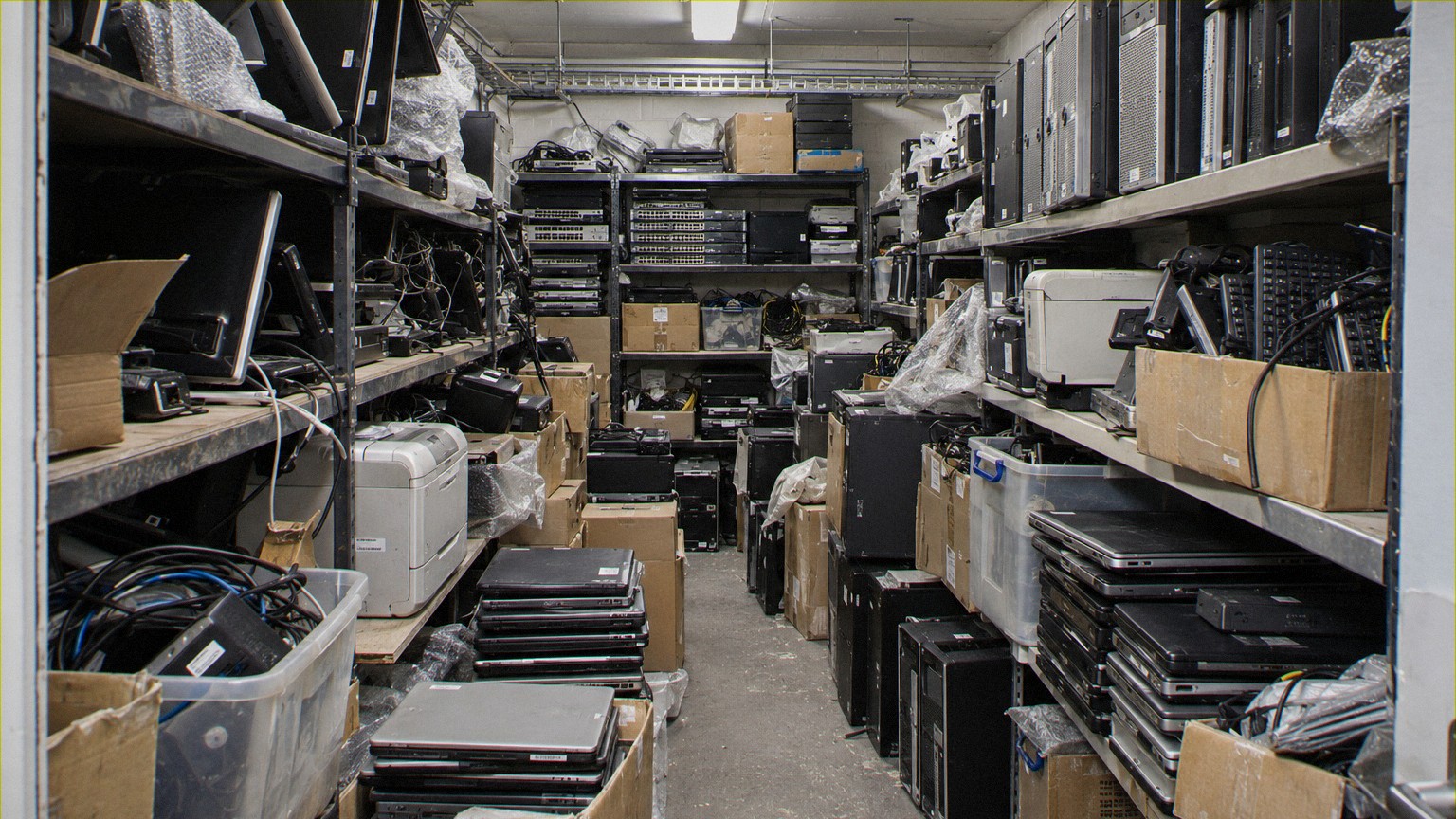
Inside are old monitors, docking stations, loose laptops, boxes of cables, retired phones and equipment nobody can identify. Some of it belongs to the business. Some may be leased. Very little appears on the current asset register.
Meanwhile, the communications cabinet is still full, nobody has confirmed who is removing the floor cabling, and the lease requires the premises to be handed back by a fixed date.
This is where office IT decommissioning becomes a problem.
Furniture removal is visible and relatively easy to plan. IT equipment is distributed across desks, cupboards, ceiling spaces, communications rooms and storage areas. It may contain sensitive data, require specialist handling or remain connected to services the business still needs.
A successful office relocation IT removal project starts by identifying everything that needs attention, not simply arranging a collection for equipment already marked as redundant.
What is actually in scope?
An office IT clearance covers more than computers and monitors. Before scheduling removal, someone needs to establish what is physically present and who is responsible for it.
The scope typically includes:
- Workstations: Desktops, laptops, thin clients, monitors, keyboards, docking stations, power supplies and peripheral equipment.
- Desk-mounted equipment: Monitor arms, swing arms, brackets, cable trays and mounting hardware that may need to be removed separately.
- Communications equipment: Desk phones, wireless access points, switches, routers, firewalls, patch panels and associated power supplies.
- Printers and multifunction devices: Including equipment with internal storage, configuration data or outstanding lease-return obligations.
- Communications cabinets: Racks, patch leads, network appliances, UPS units, power distribution equipment and associated infrastructure.
- Storerooms and cupboards: Spare equipment, obsolete devices, unlabelled boxes, damaged hardware and accumulated electronic waste.
- Building infrastructure: Floor boxes, under-desk cabling, abandoned network cables, ceiling-mounted devices and cabling identified for removal under the lease.
The final category needs particular attention. Removing a computer does not necessarily satisfy the requirement to remove its associated infrastructure.
It is also important to distinguish company-owned equipment from leased hardware, telecommunications provider equipment and items owned by building management.
An asset register is useful, but it is not a physical inventory. A site walk-through should reconcile what the register says exists against what is actually there.
Anything unidentified needs a decision before it leaves the premises.
The decisions, in order
Once the equipment is identified, the next step is assigning a destination to each asset.
The order matters.
First: what must move?
Identify equipment required at the new site, including spare devices, communications hardware and anything supporting business continuity. Confirm dependencies before disconnecting equipment.
Second: what can be redeployed?
Some equipment may not be needed at the new office but remains suitable for use elsewhere in the organisation. These assets should be separated from disposal stock and retained under appropriate custody and inventory controls.
Third: what contains data?
Before any device is released for resale, recycling or disposal, determine whether it contains storage media or sensitive configuration information.
Laptops and servers are obvious. Printers, networking appliances and other equipment may also retain information.
The IT team should confirm the required data sanitisation or destruction method, along with any contractual retention or evidence requirements. Equipment awaiting a security decision should remain controlled, not placed into an unrestricted collection.
Fourth: what has recoverable value?
Once security requirements are established, assess which redundant assets are suitable for resale or refurbishment.
Age, condition, specifications, completeness and market demand all affect recovery potential. Not every working device has meaningful resale value, particularly after handling and processing costs.
Fifth: what is genuine e-waste?
Equipment with no practical reuse or commercial recovery pathway should be directed to appropriate recycling or destruction processes.
This sequence protects against a common planning mistake: assessing resale value before deciding how data-bearing assets must be handled.
Security requirements come first. Commercial recovery follows.
For more on the removal and handling process, see Technology Decommissioning.
Make-good is a different obligation
Office decommissioning and lease make-good are related, but they are not the same job.
Removing equipment deals with the assets. Make-good deals with the condition in which the premises must be returned.
Depending on the lease and agreed handover requirements, this may include removing abandoned data cabling, communications racks, monitor brackets, floor-mounted fittings and other tenant-installed infrastructure.
The critical question is not simply, “What equipment are we taking?”
It is, “What does the lease require us to remove or reinstate before handover?”
That answer should be established with the facilities team, landlord or managing agent before the removal plan is finalised.
Some cabling can remain. Other cabling may need to be removed from ceiling spaces, floor cavities or communications rooms. Any work requiring licensed trades or specialist building access needs to be identified and assigned appropriately.
Access is another constraint. Loading docks, goods lifts, security escorts, after-hours work and building contractor requirements can all determine when equipment can be removed.
A removal schedule that ignores these restrictions can fail even when the equipment itself is ready.
The make-good deadline is usually not controlled by the IT department. That makes early coordination between facilities, IT, the relocation contractor and the building manager essential.
Server rooms raise the bar
A communications cabinet containing network switches is one thing. A server room containing production servers, storage arrays and backup infrastructure requires a different level of planning.
Before removal, IT must confirm that services have been migrated or retired, backups and retention requirements have been addressed, and equipment is authorised for shutdown.
The project also needs to account for storage media, asset dependencies, rack extraction, equipment weight, electrical isolation and secure transport.
A powered-down server is not necessarily a sanitised server. Likewise, removing a storage array does not resolve the data security requirements attached to its drives.
These projects should be scoped separately from general office equipment removal, even when they share the same site clearance deadline.
See Data Centre and Infrastructure Decommissioning for the additional considerations.
Multi-site projects change the coordination problem
Office consolidations and technology refreshes often involve several premises, sometimes across different states.
Each location may have different access arrangements, local contacts, equipment volumes and handover dates. Some sites may need equipment transferred internally, while others require complete clearance.
The challenge becomes maintaining one coordinated schedule and a consistent reporting process rather than managing disconnected collections.
A workable multi-site plan should establish common asset classifications, security instructions, collection records and reporting requirements. Site-specific exceptions can then be managed without losing visibility across the project.
Shield Solutions operates from a secure Western Sydney facility and provides national delivery for IT asset lifecycle services.
Its reporting includes serialised asset records, Certificates of Destruction, Certificates of Recycling with serial tracking, financial reconciliation and sustainability reporting, supported by a client portal.
For organisations managing multiple locations, consistent records help reconcile what was removed, what was processed and what remains outstanding.
See Reporting & Client Portal for more information.
Build the timeline backwards from handover
The most useful starting point is the date the premises must be returned, not the date someone first requests a collection.
Work backwards through the activities that must be completed before handover.
At the beginning of planning: Review the lease obligations, conduct a physical site walk-through and identify equipment, infrastructure, access restrictions and specialist work.
Before scheduling: Agree which assets are being transferred, redeployed, resold, sanitised, destroyed or recycled. Confirm ownership, technical dependencies and responsibility for each workstream.
Before removal begins: Finalise access windows, loading arrangements, contractor responsibilities, equipment shutdown approvals and the sequence of work.
During removal: Separate equipment by destination, maintain asset identification where required and record the transfer of equipment into transport or processing.
After collection: Complete the agreed sanitisation, destruction, recovery and recycling activities. Reconcile recorded assets against receipts and processing outcomes.
Before project close-out: Obtain the required records, identify outstanding exceptions and confirm that the IT removal scope has been completed.
Not every processing activity needs to be finished before the premises are handed back. However, the equipment must be removed within the agreed window, with responsibility and custody documented for anything still being processed.
Build room into the schedule for unidentified assets, access changes and additional equipment discovered during clearance. These are foreseeable issues, not reasons to abandon the plan.
Start with the scope, not the collection date
If an office move, consolidation or lease exit is approaching, begin with a complete equipment and infrastructure inventory, the make-good requirements and the handover date.
Shield Solutions can review the IT decommissioning scope, identify the asset handling and reporting requirements, and establish which removal and processing activities need to be coordinated.
The earlier these decisions are made, the easier it is to keep IT equipment from becoming an unresolved problem at the end of the move.